Patient Self-Service Kiosks
Streamline Patient Check-In and Reduce Administrative Burden
WeHealth's interactive self-service kiosks empower Canadian healthcare institutions to improve patient flow, reduce wait times, and enhance the overall patient experience through digital automation integrated with your existing systems.
Transform Your Patient Experience
Modern self-service solutions designed for Canadian healthcare environments
Why Self-Service Kiosks?
Canadian healthcare institutions face increasing patient volumes and administrative workload pressures. Self-service kiosks provide an efficient solution by automating routine tasks such as patient check-in, appointment scheduling, payment processing, and information collection.
Our kiosks integrate seamlessly with your HIS/EHR systems, enabling real-time data synchronization while maintaining compliance with Canadian privacy legislation and Infoway's interoperability standards.
- Reduce front desk workload by up to 70%
- Decrease patient wait times and improve satisfaction
- Automated appointment check-in and scheduling
- Secure payment processing with multiple payment options
- Integration with provincial health cards and identification
- Bilingual support (English/French)

Benefits for Canadian Healthcare Institutions
Improved Patient Flow
Automate check-in processes, reducing wait times and improving patient throughput. Patients can complete registration, update demographics, and confirm appointments independently.
Reduced Staff Workload
Free up administrative staff from routine tasks, allowing them to focus on complex patient needs and delivering higher-quality service to those who require assistance.
Increased Revenue Collection
Automated payment processing at point-of-service increases collection rates and reduces billing delays. Supports debit, credit, and contactless payments.
Enhanced Privacy & Security
Patients enter sensitive information privately on the kiosk, reducing verbal disclosure in public areas. Fully compliant with Canadian privacy regulations.
Accessibility & Multilingual
ADA-compliant designs with adjustable height, large fonts, and voice guidance. Support for English, French, and additional languages as needed.
Real-Time Integration
Seamlessly integrated with your HIS/EHR, practice management system, and billing software for instant data synchronization and accurate patient records.
Our Kiosk Solutions
Tailored configurations for different healthcare settings
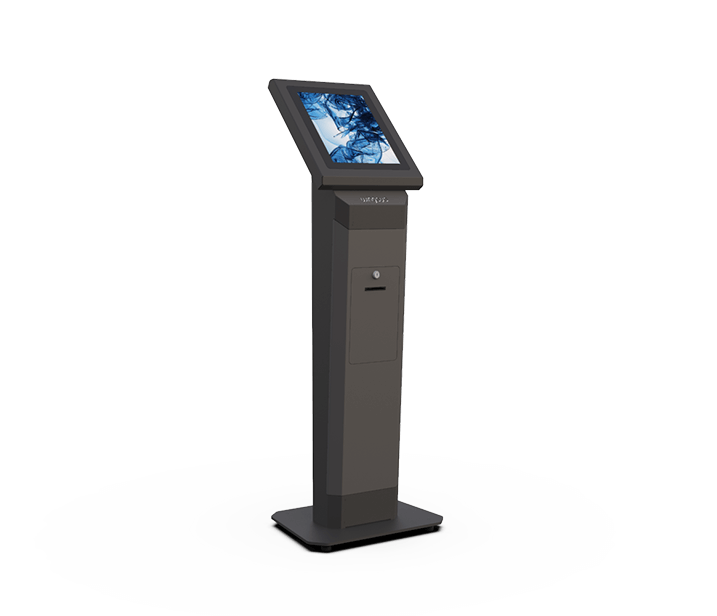
Patient Check-In Kiosk
Streamline patient arrival and registration with our comprehensive check-in solution
Key Features:
- 17" or 22" HD Touchscreen - Intuitive, responsive interface
- Health Card Scanner - Provincial health card verification
- ID Scanner - Driver's license and passport support
- Appointment Verification - Real-time schedule confirmation
- Demographic Updates - Patients update contact information
- Digital Forms - Consent forms, questionnaires, screening tools
- Insurance Verification - Automated eligibility checking
- Queue Management - Integration with waiting room systems
Payment & Billing Kiosk
Secure, efficient payment processing integrated with your billing system
Key Features:
- 17" or 22" HD Touchscreen - User-friendly payment interface
- Multi-Payment Options - Credit, debit, contactless (Interac, Apple Pay, Google Pay)
- Receipt Printer - Physical and email receipt options
- Invoice Lookup - Patients can view outstanding balances
- Payment Plans - Set up installment payment arrangements
- Insurance Claims - Real-time adjudication for private insurance
- PCI DSS Compliant - Highest security standards for payment processing
- Cash Acceptance - Optional bill/coin acceptor modules
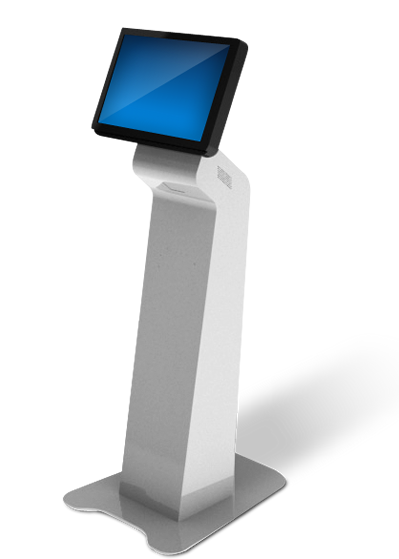
Information & Wayfinding Kiosk
Help patients and visitors navigate large healthcare facilities with interactive wayfinding and information access.
Key Features:
- Interactive Maps - Floor plans, department locations, parking
- Directory Services - Physician finder, department listing
- Appointment Scheduling - Book appointments for various services
- Educational Content - Health information videos and resources
- Service Information - Hours, contact details, visiting policies
Technical Specifications
Hardware Options
- 17", 22", or 27" HD touchscreen displays
- Wall-mounted or floor-standing enclosures
- Thermal receipt printers (80mm)
- Health card/barcode scanners
- Payment terminals (EMV, contactless)
- Webcam for telehealth/video support
- Speakers and microphones
Software Features
- Custom-branded user interface
- Bilingual support (EN/FR)
- Accessibility features (voice guidance, large fonts)
- Remote configuration and management
- Real-time monitoring and alerts
- Usage analytics and reporting
- Automatic software updates
Integration Capabilities
- HL7 v2.x and FHIR R4 interfaces
- RESTful API connections
- Database integration (SQL Server, Oracle, etc.)
- Provincial health registries
- Payment gateways (Moneris, Chase, etc.)
- Queue management systems
- Electronic signage displays
Security & Compliance
- PIPEDA compliant data handling
- Encrypted data transmission (TLS 1.3)
- PCI DSS Level 1 for payment processing
- Auto-timeout and screen clearing
- Audit logging and traceability
- Role-based administrative access
- Regular security updates and patches
Simple Implementation Process
From consultation to go-live in a matter of weeks
Discovery & Planning
We assess your facility, patient flow, technical requirements, and integration needs. Develop a customized deployment plan with timeline and milestones.
Configuration & Integration
Custom branding, interface design, and workflow configuration. Integration with your HIS/EHR, payment systems, and other applications. Testing in staging environment.
Installation & Training
On-site installation and configuration. Comprehensive training for staff on kiosk management, troubleshooting, and patient assistance. User acceptance testing.
Go-Live & Support
Phased rollout with on-site support. Ongoing monitoring, maintenance, and optimization. 24/7 technical support from our Canadian-based team.
Ready to Transform Your Patient Experience?
Let's discuss how self-service kiosks can improve efficiency and patient satisfaction at your institution
Schedule a Demonstration Learn More About WeHealth